Is your website ready for AI search? A 15-minute check
In short
In 15 minutes you can check the six things that most often stop AI tools from using a website: blocked crawlers, text hidden in scripts, vague opening lines, missing business details, broken structured data and no clear answers. A scanner does the same faster across more pages, but no tool can see exactly how often you are cited.
You can check whether your website is ready for AI search in about 15 minutes with a browser and a notepad. The check below covers the six problems that most often stop tools like ChatGPT, Gemini and Perplexity from reading and quoting a site.
You do not need technical skills. Where a step needs a web developer to fix, we say so. At the end, we explain what our automated scanner adds and, just as important, what it cannot tell you.

What do I need before I start?
- Your website address
- A computer with a normal browser (phone browsers hide some of the tools)
- Three questions a real customer would ask, such as "how much does a bathroom refit cost in Leeds?"
- A notepad for problems you find
Minutes 0 to 2: what do AI tools say about you now?
Ask two or three assistants one of your customer questions. Then ask directly: "What do you know about [your business name] in [your town]?"
Write down which websites they cite. If they cite competitors, open those pages later and see how they answer the question. Treat it as your starting point. Answers vary from one try to the next, so do not read too much into a single result.
Minutes 2 to 4: are AI crawlers allowed in?
Open https://yourdomain/robots.txt in your browser. This small file tells crawlers what they may read.
Look for these warning signs:
Disallow: /underUser-agent: *blocks every crawler that has no group of its own.Disallow: /underOAI-SearchBot,PerplexityBot,Claude-SearchBotorbingbotblocks AI search for that company. OpenAI says sites that block OAI-SearchBot will not be shown in ChatGPT search answers.- Do not rely on robots.txt to hide private pages. Google says it is no way to keep a page out of Google.
- A "page not found" for robots.txt is not a disaster. Crawlers that follow the standard then treat the whole site as open.
Not sure what each name means? Our AI crawlers guide explains every bot, as of November 2026, and has a snippet to copy.
Minutes 4 to 7: is your main text in the page code?
Some websites build their text with scripts after the page loads. You cannot count on every crawler running those scripts, and if it does not, it sees an almost empty page.
To test, open your homepage, right-click and choose View page source (or press Ctrl+U, Cmd+Option+U on a Mac). Press Ctrl+F and search for a sentence from your page, like your opening line or your phone number.
- Found it: good.
- Not found: your text is drawn by scripts. Ask your web developer about server-side rendering, which means building the full text into the page before it is sent.
Also check that key facts are text, not pictures. A price list saved as an image is invisible to a text reader.
Minutes 7 to 10: does your first paragraph answer the question?
Read the first two sentences of your homepage and your main service page as if you were a stranger. Do they say what you do, who it is for and where?
Compare these two openings:
| Vague | Clear |
|---|---|
| "Welcome to our website. We are passionate about quality." | "We repair and service bikes in central Bristol. Most repairs are done the same day." |
| "Solutions tailored to your needs." | "We write fixed-fee wills for couples in Kent. Prices are listed below." |
AI tools lift short passages. The clear version can be quoted as an answer; the vague one cannot. While you are there, check whether some headings read like real questions, such as "How much does it cost?", with the answer right below.
Minutes 10 to 13: can anyone tell who is behind the site?
Check that these are easy to find, in text:
- [ ] Business name on every page
- [ ] Address or service area, and phone or email, ideally in the footer
- [ ] Opening hours, if you have them
- [ ] An About page that names real people or the business
- [ ] Dates on articles and guides
- [ ] Privacy and terms pages linked in the footer
- [ ] A few real customer reviews, with names
These are signs of a real business. They help visitors and they help AI tools decide whom to trust.
Minutes 13 to 15: is your structured data valid?
Structured data is hidden code that describes your business to machines in a standard format. Paste your homepage address into Google's Rich Results Test or the Schema Markup Validator.
- Nothing detected: worth adding. Our structured data guide shows examples.
- Errors: note them for your developer.
- Details that disagree with the page: fix these first. Google says to keep structured data consistent with the visible text on the page.
Then pick your three most serious problems from the notepad. Fix those before anything else.
What does an automated scan add?
The manual check covers one or two pages. An automated scan repeats it across more pages and catches details you would miss by eye.
Our free scanner runs in about a minute and reads up to 10 pages of your site. First it opens your homepage and looks at it as a visitor would. Then it checks your robots.txt for the main AI crawlers and finds your main pages. Last, it reads hidden details such as structured data, checks for clear answers and works out a score. It runs over 30 checks in four groups: crawler access, machine readability, answer readiness and trust signals.
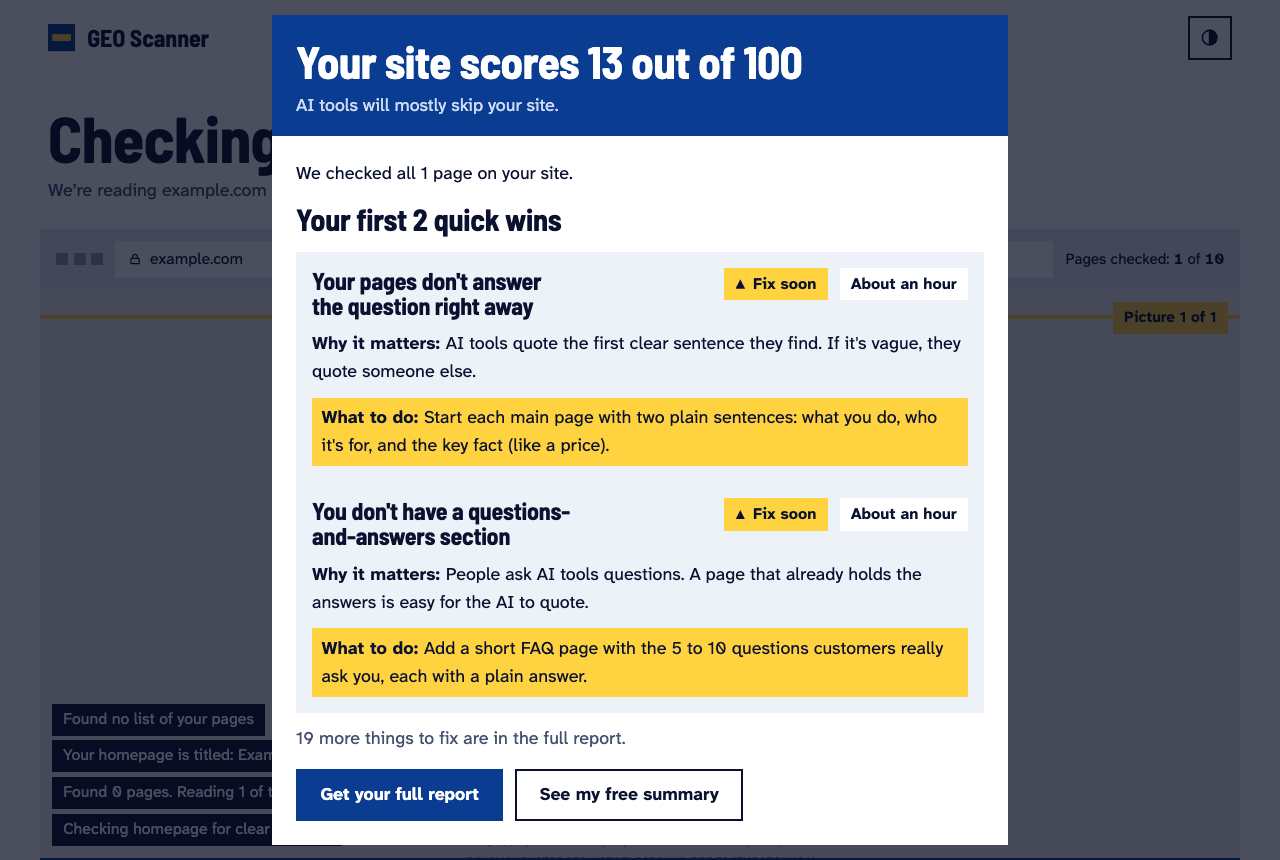
Each finding comes with a plain explanation, why it matters, what to do and roughly how long the fix takes. Our methodology page lists every check and how the score is weighted.
What can no tool tell you?
We want to be straight about the limits, ours included.
- No tool sees actual citations across all assistants. The companies do not publish that data for every product. Bing Webmaster Tools is a partial exception: it reports citations in Copilot and Bing AI answers for verified sites.
- A readiness score measures obstacles. A high score means fewer reasons to skip you. It does not promise a citation.
- A sample is a sample. A scan of 10 pages may miss a problem on page 11.
- Rules change. Crawler names and policies change. We date our guides for that reason.
Our view: use the score to find and fix obvious problems, then judge progress by asking assistants your customer questions again a few weeks later.
Frequently asked questions
How often should I run this check?
After any website redesign or platform change, and otherwise every few months. Platform updates sometimes rewrite robots.txt or page templates without telling you.
My site is built on a website builder. Can I still fix these things?
Most builders let you edit page text, headings, contact details and often robots.txt and structured data in settings. Check your builder's help pages for the exact menus.
Does a high score mean ChatGPT will recommend me?
No. It means your site is easy to read and quote. Whether an assistant picks you also depends on what other sites say and how well you answer the question.
What is the single most common problem?
We do not publish a figure until we have enough scans to report it honestly. On the manual check, start with crawler access and opening sentences: they are quick to fix and they matter most.
Sources
- Google Search Central: AI features and your website
- OpenAI: Overview of OpenAI crawlers
- Google Search Central: Introduction to structured data
- Google: Rich Results Test
- Schema.org: Schema Markup Validator
- Bing Blogs: New AI Visibility Insights in Bing Webmaster Tools (June 2026)
- Google Search Central: Introduction to robots.txt